MATRIX HAL Setup Raspberry Pi and Demo Scripts
What is MATRIX HAL? HAL or Hardware Abstraction Layer is the lowest level layer of the MATRIX Creator drivers. You can either interact directly with HAL, or use the higher level components like MALOS or the MATRIX OS to tinker with the MATRIX Device. This uses C++ drivers for available sensors and hardware. Sponsor Link…
What is MATRIX HAL?



Sponsor Link
This Project is Sponsored by UTSource. UTSource is a professional electronic components supplier.Things Needed[AdSense-C]
Raspberry Pi Matrix Device Micro SD Card Active Internet Connection A Power Adapter ( Min 2.3 Amp) Camera (Optional)
Step 1 : Setting Up Raspberry Pi
Download and burn latest Raspbian image to a micro SD card and insert it into the raspberry Pi. Now power it up with a power adapter that can provide at least 2.5 Ampere. Now fire up your terminal and create a password for the user ‘pi’ by executing the commandsudo passwd pi[AdSense-C] Connect your Raspberry Pi to a WiFi router or Wired network and make sure it is connected by checking whether it is getting an IP address from the switch. Now perform and update and upgrade by running
sudo apt update -ysudo apt upgrade -y
Step 2 : Connect MATRIX Device to Raspberry Pi
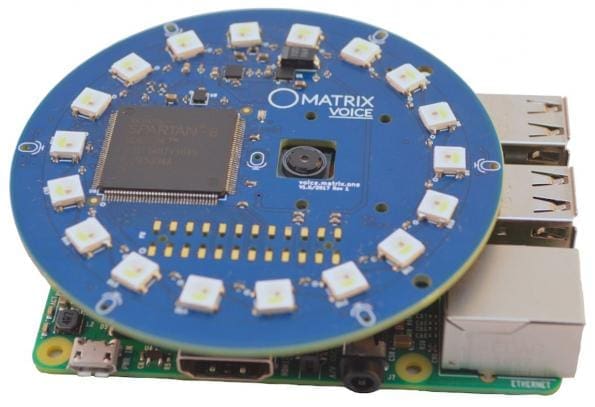
Now simply align the header pins and slowly connect the MATRIX device to your Raspberry Pi
Step 3 : Adding the key and repository
curl https://apt.matrix.one/doc/apt-key.gpg | sudo apt-key add -

echo "deb https://apt.matrix.one/raspbian $(lsb_release -sc) main" | sudo tee /etc/apt/sources.list.d/matrixlabs.list
Step 4 : Perform Update and Upgrade
sudo apt-get update

sudo apt-get upgrade
Step 5 : Installing the MATRIX Software
sudo apt-get install matrixio-creator-init

sudo reboot
Step 6 : Setting Up HAL
Install Required Packagessudo apt-get install git cmake g++ libfftw3-dev wiringpi libgflags-dev
Step 7 : Download HAL[AdSense-C]
git clone https://github.com/matrix-io/matrix-creator-hal.git
Step 8 : Build
cd matrix-creator-hal/

mkdir build

cd build/

cmake ..

make -j4
Running the Demos[AdSense-A]
Now from the build folder, go to the folder demo cd demos/ From there, you can choose any demo script and run it./arc_demo
./mic_energyRate the Project Did you find this page useful? Help us to improve by rating this page.
[RICH_REVIEWS_FORM]
[RICH_REVIEWS_SNIPPET stars_only=”true”]